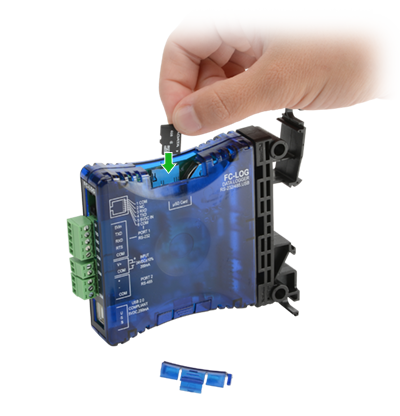
Stand-alone data logger · CSV, Excel ready · No network needed
PLC DataLogger: a simple “black box” for your PLC
The PLC DataLogger (FC-LOG) from InterConnecting Automation Inc., an AutomationDirect Federation Company, is a low-cost, stand-alone logger for AutomationDirect PLCs and any Modbus-enabled PLC or device. It records up to 55 addresses to a 4GB microSD card in Excel-ready CSV files, so you can track production, uptime, downtime and the reasons behind it, or log current, voltage and frequency from a Modbus drive. There are no networks to configure: set it up on your computer, plug it into your PLC, and it starts collecting. It's the perfect black box, even though it's blue.
DataLogger at a glance
Logs
Up to 55 addresses
Storage
4GB microSD included, up to 32GB
Capacity
About 1,047,000 rows on 4GB
File format
CSV, Excel ready
Ports
RS-232 & RS-485 (single drop)
Power
From the PLC port or 24 VDC
What it logs
See what your machine is really doing
Pick up to 55 addresses from your PLC or Modbus device and let the logger record them. Designed by a 38-year industry veteran, it follows one rule: keep it simple.
✓Production counts and reports
✓Uptime, downtime and reasons for downtime
✓Drive current, voltage and frequency
✓Process values from any Modbus device
✓Troubleshooting intermittent machine faults
✓Proving what happened, and when
How it works
Three steps to your first log file
01
Configure it
Plug the logger into your computer by USB. It shows up as a drive, and the configuration software is already on it. Pick the addresses you want to log.
02
Plug it in
Unplug it from your computer and plug it into your PLC or Modbus device with the included cable. No networks to set up and no external power needed.
03
Collect your data
The logger quietly records to its microSD card. Plug it back into your computer to open the CSV files in Excel.
Compatibility
Works with the PLCs and drives you already have
Connect over RS-232 or RS-485 (single drop) to AutomationDirect PLCs or any device that speaks Modbus.
✓Most DirectLOGIC PLCs
✓All CLICK PLCs
✓All Do-more PLCs
✓All Productivity PLCs
✓Modbus AC/DC drives
✓Any Modbus-speaking PLC or I/O module
In the box
Logger: PLC DataLogger with configuration software pre-installed
Storage: 4GB microSD card, user-upgradeable to 8GB, 16GB or 32GB
Cable: RJ12-to-RJ12 cable that carries both communication and power, so no external power is needed
Resources
Documents, videos and sample files
Documents and videos
Sample log files
Download real log files to see exactly what you’ll get in Excel.
FAQ
Frequently asked questions about the PLC DataLogger
Q.What PLCs does it work with?
Most DirectLOGIC PLCs, all CLICK, Do-more and Productivity PLCs, and any Modbus-speaking device, including PLCs, AC/DC drives and I/O modules.
Q.What can it log?
Up to 55 addresses, such as production counts, uptime and downtime, reasons for downtime, and drive current, voltage and frequency from a Modbus-enabled drive.
Q.How do I get my data?
Plug the logger into your computer by USB. It works like a flash drive, and the CSV files open right in Excel.
Q.How much data does it hold?
The included 4GB microSD card holds about 1,047,000 rows of CSV data. You can upgrade to an 8GB, 16GB or 32GB card.
Q.How do I upgrade the microSD card?
Buy an 8GB, 16GB or 32GB microSD card formatted FAT32 (not NTFS), copy the files and folder from the 4GB card onto it, then swap it into the logger.
Q.How is it powered?
Through the PLC communication port using the included cable, so no external power is needed. It can also run on 24 VDC.
Q.What cables do I need?
The included RJ12-to-RJ12 cable uses the same wiring as AutomationDirect’s DV-1000CBL, and C-more Micro cables also work. For the 15-pin port on DL06, D2-250-1 and D2-260 CPUs, use AutomationDirect’s FA-15HD adapter. See pages 24–26 of the C-more Micro specifications for other cable options.
Q.Do I need to set up a network?
No. The logger is stand-alone. Configure it on your computer, plug it into the PLC and it starts collecting.
Q.Is there software to install?
No. The configuration software comes pre-installed on the logger. Our free tutorial videos walk you through setup.
Q.Can I return it?
Yes. The PLC DataLogger has a 30-day money-back guarantee. Call us for an RMA number and return it in its original packaging with all items, and we’ll issue a refund once we receive it.
Q.How do I order?
Add it to your cart on this page, use our contact form, or call 414-425-8348.
Q.Not sure it will work with your PLC or drive?
Talk to one of our experts. Tell us what you’re connecting to and what you want to log, and we’ll help you set it up.
Ready to see what your machine is doing?
Add the PLC DataLogger to your cart on this page. It’s backed by a 30-day money-back guarantee.